
Add your first AI agent
Last updated:
How adding an agent works on Crewdle: pick a role in Explore, choose its model, give it work in plain language, approve what it proposes, and pay per task.
An agent on Crewdle is a persistent teammate, not a chat window. It has a role, its own memory, files and skills, and access to the tools you allow. You add it once, give it work in your own words, and it comes back with results, with questions when a decision is yours, and with a log of what it did and spent. It runs around the clock in a secure environment Crewdle operates, whether or not you are signed in.
Do’s and don’ts
Do
- Say the goal, who it’s for and what “done” looks like in your first message
- Say what you’ll do with the result (“I’ll share it with my team”)
- Attach the file in the same message
- Ask for a plan first on big jobs
- Ask for 2 or 3 options in one request
Don’t
- Send one-liners like “make a report”
- Make the agent guess the format, the language or the audience
- Paste a whole document as text when you can attach it
- Start a long, costly job on a vague request
- Regenerate again and again to compare versions
Do’s and don’ts
Do
- Give a complete job, with the result you expect
- Let the agent finish, then add new ideas as a new request
- Answer its question cards the same day
- Use a team (project) for multi-step work
- Decline a plan you disagree with and say why
Don’t
- Hand over a fragment and correct it step by step
- Interrupt with corrections while it’s working
- Leave cards waiting for days
- Run unrelated jobs in one long conversation
- Approve a plan you don’t agree with “to see”
Pick a role
Inside Crewdle, open Explore: 78 ready-made agents across operations, marketing, sales, support, finance, people, legal, product, engineering, research and data, plus 26 pre-made teams. Each card shows what the agent does, the skills it arrives with and the tools it suggests connecting. The same roles have their own pages in the public catalogue, with what you hand the agent, what you get back, and what a typical task costs. If several distinct skills are needed at once, add a team instead: a manager agent plans the work and briefs its specialists. See Teams.
Not sure who you need? Describe the job on the home page, or ask in a Crewdle chat, and Crewdle proposes the agent or team that would do it. No exact fit? Click New agent in the Agents section of the sidebar and describe the role yourself.
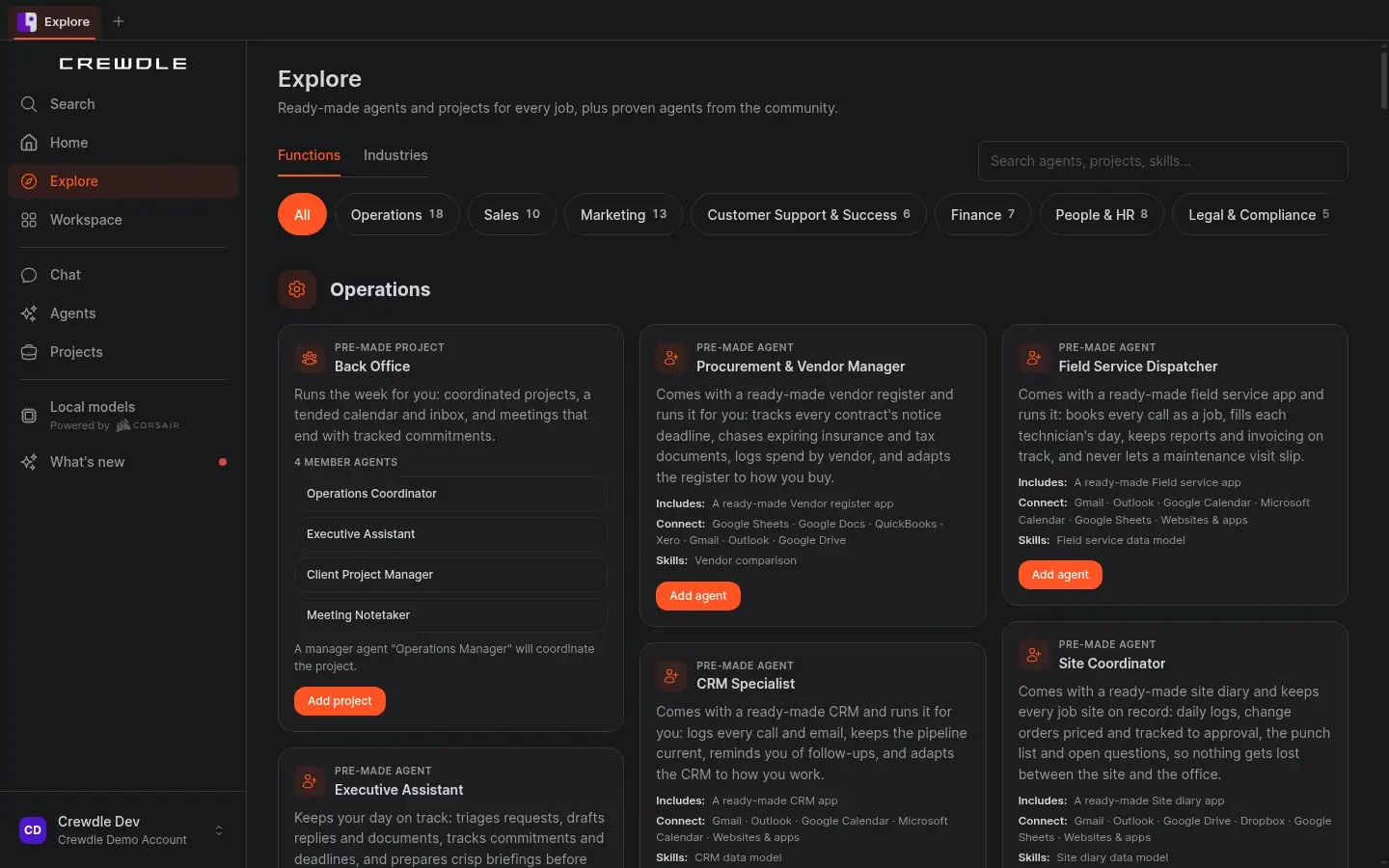 Explore in the app: filter by department, then add a pre-made team or a single agent.
Explore also lists community agents for rent: proven agents other organizations have trained and listed. A rental is your own private copy; you pay your usage plus the owner's royalty.
Add it
Click Add agent on a card, or on the agent's page in the catalogue. A review step shows the setup before anything is created, including the model the agent will use: agents from Explore default to the latest Claude Opus or Sonnet models, and you can pick any other model your organization allows (for a team, you pick each member's model). Confirm, and the agent appears in your sidebar like a new colleague. Adding an agent itself costs nothing; you pay only when it works. New accounts start with $10 in your balance and no card is needed.
In the Refine step of the setup wizard you can turn on Private AI mode. With a private agent, the model provider keeps none of the data, and its AI automation runs are private too. It costs more (2.0× the model price instead of 1.5×, except agent memory embeddings, which stay at the standard price) and cannot be changed after adding. A private agent shows “· Private” next to its model. It can use image, video, 3D and Roblox tools, but Private AI mode makes no zero-retention promise for the models those tools call. It keeps its logs and history, stored in dedicated infrastructure in the region your organization chose. It is also available when you add a pre-made agent from Explore. See Private AI mode.
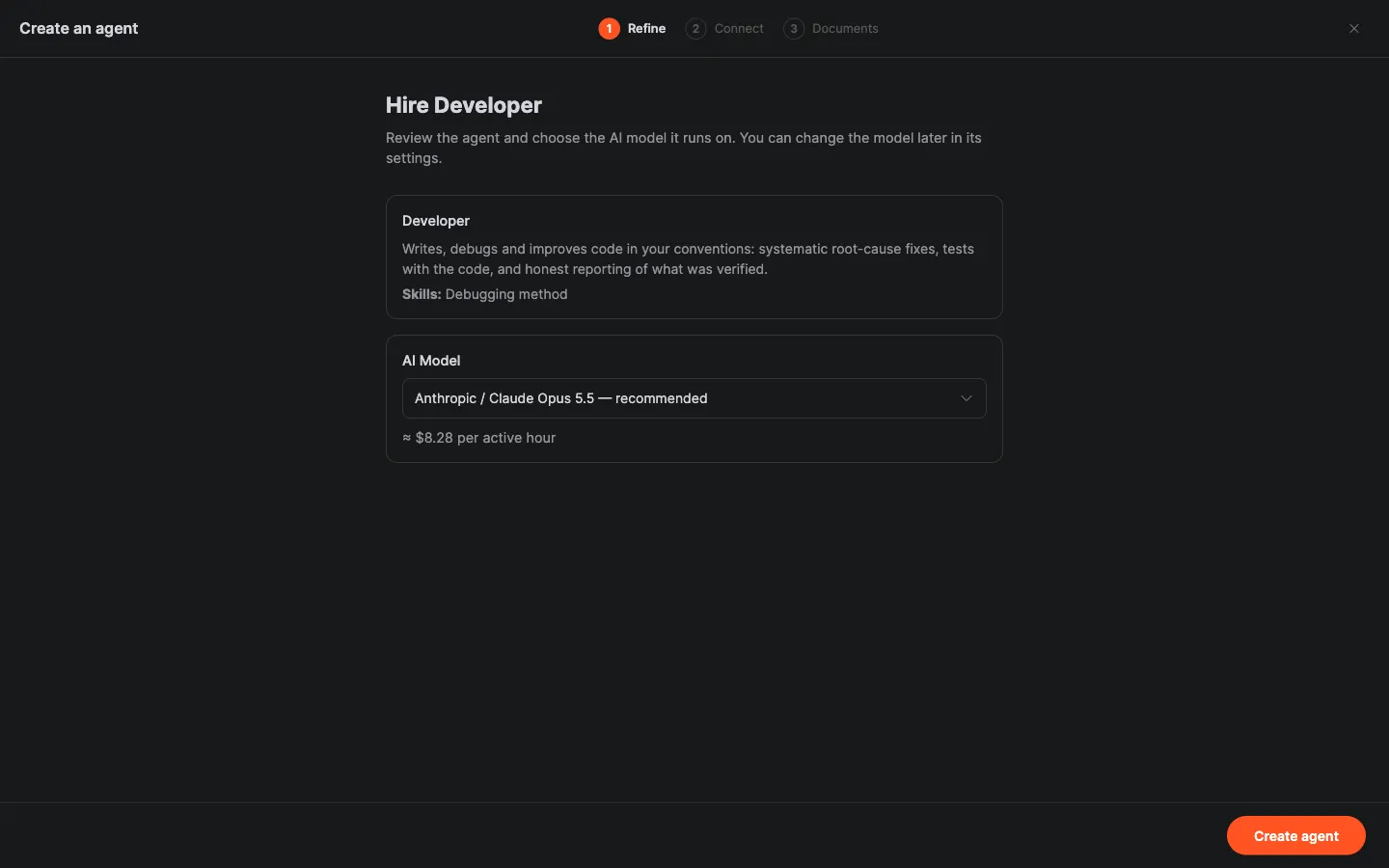 Adding a single agent: review its role and skills, pick its model, and see an estimated cost per active hour.
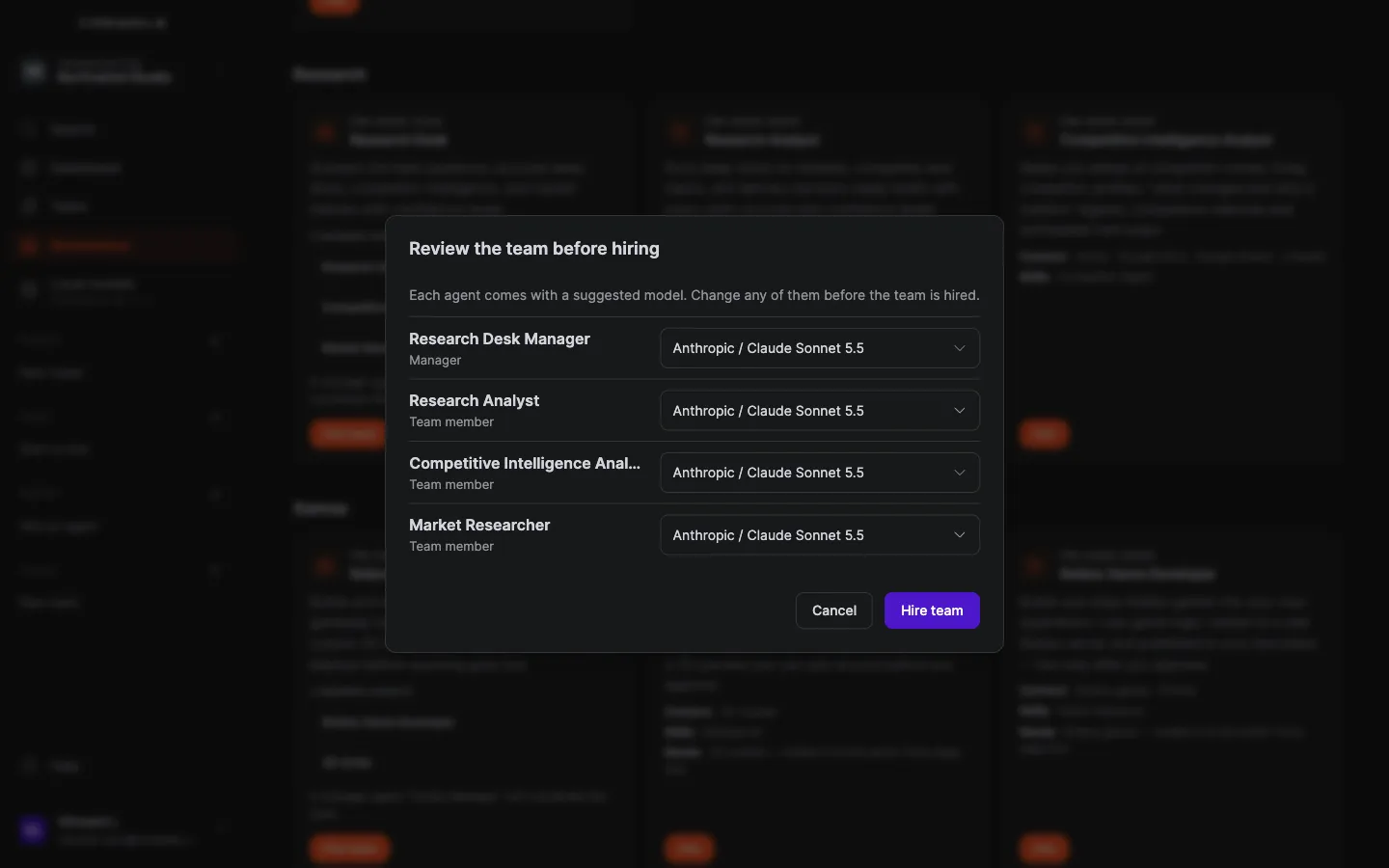 Adding a team: each member comes with a suggested model you can change before the team is added.
Give it work
Open the agent and describe the job the way you would to a person: the goal, the context, what good looks like. Attach files. Connect the tools it should use (email, calendar, storage, accounting, e-commerce): the setup wizard offers a Connect what it needs step, and you can always do it later in the agent's Tools panel. It only touches what you authorize.
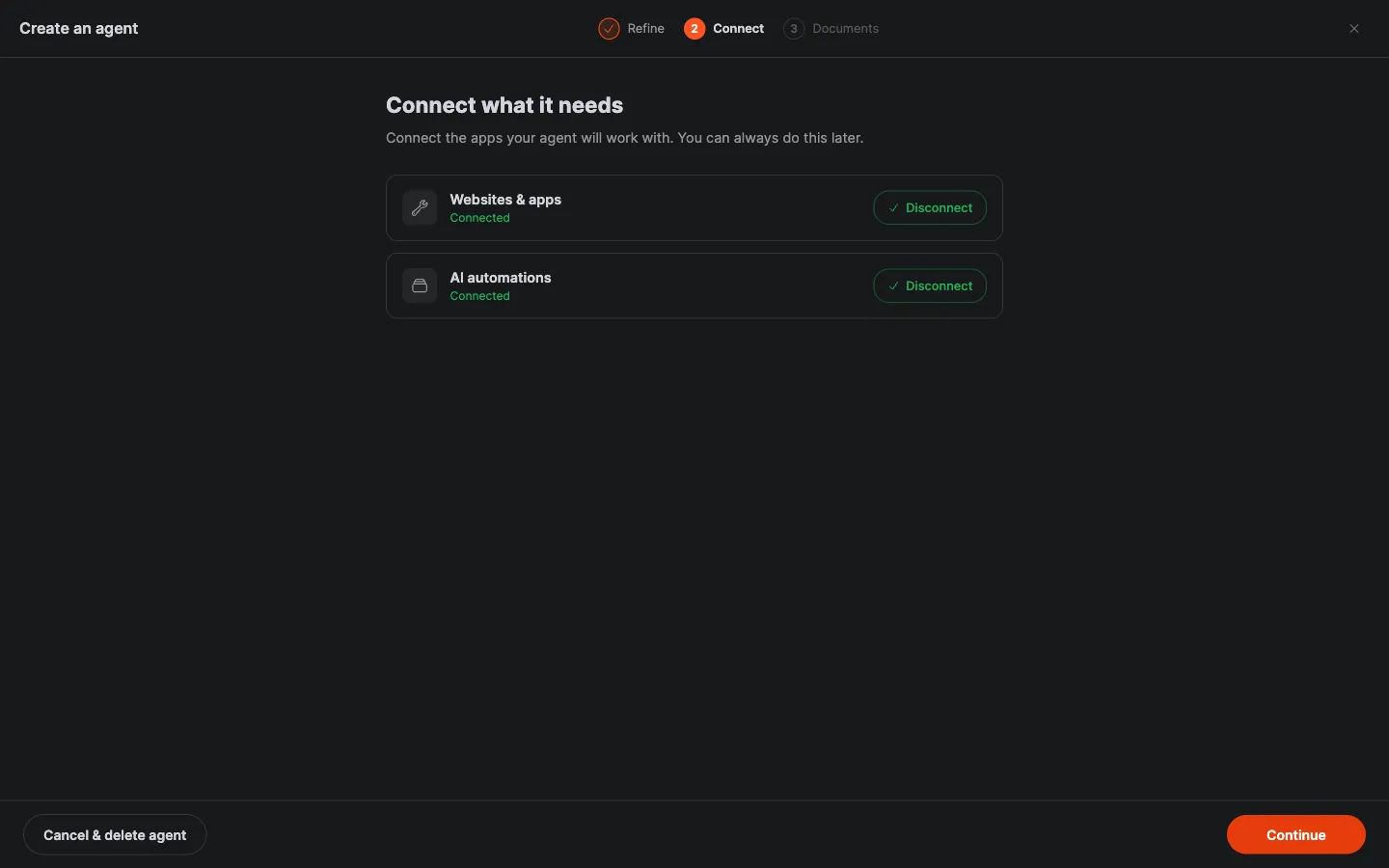 The Connect step of the setup wizard: connect the tools the agent will work with, now or later. Every request you give it becomes a task on the Tasks board, with live progress and what it spent.
Nothing goes out to a customer or a vendor without your approval: drafts wait for you, sensitive actions wait on an approval card, and the agent asks on a question card when a decision is yours to make. Work you schedule runs on its own, around the clock, and the agent leaves you a message when something needs you.
Give it a complete first job (see the examples below), then let it finish before adding new requests.
Review, approve, repeat
Answer its first question cards quickly; it waits for you.
Every agent keeps a full log of what it did and spent, turn by turn, and you can cap it with a monthly budget. What it learns about your business, its memory, files and skills, lives in your workspace, not inside a model. Change its model any time and it keeps everything.
See Train an agent to work the way you do for shaping its voice and habits, and Balance and billing for how a task is priced.
The agent’s mailbox
Every agent you add has its own email address, shown with a copy button under Mailbox in the agent menu. The Inbox, Sent and Held tabs show what it received and sent. Mail from members of your organization and from contacts it has emailed reaches the agent. Mail from anyone else waits in Held, and only the person who added the agent can let it through. The agent’s first email to someone new needs your approval on a card.
Ready-made apps
Some roles include a ready-made app, such as a CRM for the CRM Specialist. When added, the box “Include a ready-made app” is ticked by default; untick it to add the agent alone. The agent sets up the app in the background in a few minutes and it appears as a website project of the person who added it. You and your colleagues sign in to the app with your email. The app goes live automatically. It needs a connected environment and funds in your balance; without them, the agent is added without it and says why. See the roles with a ready-made app.
Requests to try
Add the right agent from Explore
I need help with [answering customer emails after hours]. Suggest the best agent from Explore for that, tell me what it will need (inbox, rules), and help me add it.
First task for a new agent
(to the new agent) Here’s your first job: [go through the last 20 customer emails in our inbox, group them by topic, and draft a reply template for the 3 most common questions]. Ask me if anything is unclear before you start.
Weekly sales summary (Word)
Each week I need a one-page sales summary: total orders, top 5 products, and anything unusual compared to last week. Use [the attached export / our Shopify data]. Put it in a Word document I can forward to [my partner], in [French].
Replace the [brackets] with your details. The more context you give, the better the first answer.
Frequently asked questions
How much does a new agent cost me up front?
Nothing until it works. Billing is per task rather than per seat, most jobs cost under two dollars and an idle agent costs nothing. A new account starts with $10 in your balance and asks for no card.
Does the agent work when I am not signed in?
Yes. Agents run in Crewdle’s secure environment, not in your browser. Scheduled work runs around the clock, and when the agent needs a decision it leaves you a message to find when you are back.
Is an agent tied to one model once it is added?
No, you can switch at any time. Its memory, files and skills live in your workspace rather than in a model, so a new provider keeps everything it has learned. A private agent may switch too, as long as the new model also has zero retention.
What if no role fits, and can I pick the model?
Describe the job on the home page and Crewdle proposes the closest agent or team. Every agent is also shaped after adding: add instructions and skills, load your documents, and connect different tools. The review step shows each agent’s model before you confirm. Agents from Explore default to the latest Claude Opus or Sonnet models, and you can pick any model your organization allows.
Can I add an agent privately?
Yes. Turn on Private AI mode when you add the agent. The model provider keeps none of the data. It costs 2.0× the model price instead of 1.5×, and cannot be changed afterwards.
Can I rent an agent instead of adding one?
Yes. Explore lists community agents for rent. You get a private, already-trained copy and pay your own usage plus the owner’s royalty.
