
The secrets vault: credentials agents use but never read
Last updated:
Store passwords and API keys in a project or agent vault so Crewdle agents can use them, even typing them into a browser, without ever reading them.
Some work needs a password or an API key: signing in to a supplier's portal, calling a service, setting up a sign-in provider for an app. The secrets vault lets agents use those credentials without ever reading them.
Do’s and don’ts
Do
- Store passwords and API keys in the vault
- Use private AI mode for sensitive work
- Remove access when someone leaves
Don’t
- Paste passwords or keys in a message
- Put sensitive data in Chat (no private mode)
- Share your account with a colleague
How it works
Each project has its own vault, and so does each agent working on its own. You store a secret once, and the agent refers to it by name. When it uses the secret, Crewdle fills in the value, so the agent never sees it.
To add one, open the project’s options menu (or the agent's, for an agent working on its own), choose Secrets, then Add a secret. Pick A login or An API key, give it a name, and name the website it's for. A secret only works on that site and its pages: a login for one Shopify store never reaches another store.
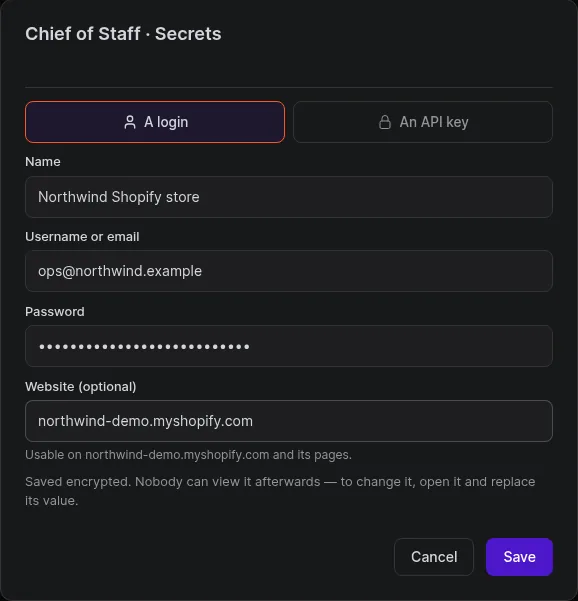
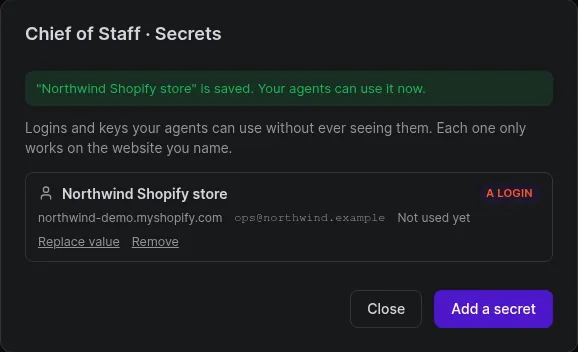
Once saved, nobody can view the value again, you included. The vault lists each secret with its site and when an agent last used it.
Passwords in a browser session
An agent working in a browser session can type a stored password into a sign-in form without ever reading it.
Sign-in provider details on a secure card
When an agent builds an app that needs a sign-in provider, it asks for the provider's details on a secure card. What you enter goes straight to the vault, not into the chat.
Good practice
- Use a dedicated account or key for the agent where you can, with only the access it needs.
- Rotate a secret in the vault when you rotate it at the source.
- For connected apps like Gmail or QuickBooks, use their connection instead: an admin enables the integration and you connect your account. See Integrations and Security.
Frequently asked questions
Can an agent read a secret from the vault?
No. It refers to the secret by name and Crewdle fills in the value when it’s used, so the agent never sees it.
Who shares a vault?
The agents of a project share the project’s vault. An agent working on its own has its own.
